General Driver Guidelines
Wherever possible, we try to have drivers on Microsoft’s Windows Update system for all of our products. In this case, plugging the hardware into a network-connected Windows 7 system (and Vista/XP with Windows Update for hardware enabled) will trigger automatic detection, download, and install of the proper drivers.
For Mac, if a driver is not provided by the operating system, they must be downloaded and installed.
For Linux, recent kernels should have open source driver support for most Plugable products. However, configuration on Linux, especially for USB graphics products, involves hand-editing of configuration files and is for very advanced users only.
USB graphics products
We use DisplayLink chips in all our USB graphics products. Please download the latest drivers at http://www.displaylink.com/support/downloads.php/
USB network products
We use ASIX chips in all our USB network products. Please download the latest drivers at http://www.asix.com.tw/download.php
Specifically for our USB to Ethernet products, please visit
![]() |
1000Mbps Gigabit Ethernet | ASIX AX88178 driver download page |
![]() |
100 Mbps Fast Ethernet | ASIX AX88772 driver download page |
Note that you will need to extract any .rar files completely to your disk first using a program like 7-Zip, before running setup.exe from a normal Windows folder (not from within the zip utility).
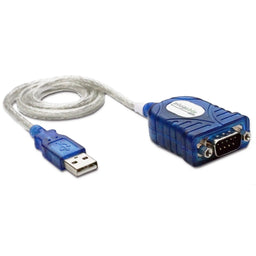
USB serial (RS-232) products
We use Prolific chips in all our USB to serial products. Please visit our Prolific PL2303 driver download page for all operating system options.
USB 3.0 Expansion Cards
We use the NEC/Renesas µPD720200 chipset in all our USB 3.0 Expansion Cards which use the Renesas-USB-3.0 driver.
USB Audio Products
Our USB Audio products use C-Media chips and support the USB Audio class standard and use the built-in drivers on Windows, Mac, and Linux – no driver install is needed.
USB Storage Products
Our USB Storage and hard disk docking products support the USB Mass Storage specification and use the built-in drivers on Windows, Mac, and Linux – no driver install is needed.
USB Hub Products
USB hubs are supported by the built-in drivers on nearly all USB computing platforms (and always on Windows, Mac, and Linux).
Questions?
Visit plugable.com/support or email support@plugable.com.