Head-to-Head: Plugable UD-MSTH3 vs. HP USB-C 100W G6 Dock
Product Owners | October 15, 2026

TL;DR
- The Plugable UD-MSTH3 offers three native HDMI 2.0 outputs, an integrated SD/MicroSD card reader, and a dedicated 30W USB-C charging port at $149.99.
- Both docking stations provide multi-display support, host laptop charging up to 100W, and a 2.5Gbps Ethernet port.
- The Plugable UD-MSTH3 is verified to support 1x 4K 60Hz + 2x 1080p 60Hz simultaneously in triple-monitor mode, or 2x 4K 60Hz in dual-monitor mode.
- HP does not specify the supported display resolutions for single, dual, or triple monitor configurations.
- The HP G6 dock features two DisplayPort 1.4 outputs and one HDMI 2.1 port, meaning users with HDMI-only monitors must source active conversion cables for triple-display setups.
- Apple has chosen not to implement DisplayPort MST support within macOS, so neither dock is well suited for Apple MacBook or Mac desktop hosts.
Choosing the right compact desktop docking station can drastically impact your daily workflow, cable management, and multi-monitor setup flexibility. Today, we are taking a detailed look at two popular contenders: the Plugable UD-MSTH3 USB Type-C Triple HDMI Docking Station with MST and the HP USB-C 100W G6 Dock Triple Display with MST.
Both docking stations provide multi-display support, host laptop charging up to 100W, and a range of high-speed external device connections. However, key differences in display output options, peripheral port selection, price, and manufacturer documentation set them apart.
Multi-Stream Transport (MST) Compatibility: Windows vs. macOS
DisplayPort Multi-Stream Transport (MST) enables Windows 11 and ChromeOS host computers to transmit multiple independent video streams over a single USB-C cable, whereas Apple macOS lacks MST support and restricts external displays to either a single display or hardware mirrored mode.
Multi-Stream Transport (MST) is a core feature of DisplayPort 1.2 and newer standards. MST allows a single USB-C port utilizing DisplayPort Alternate Mode (Alt Mode) to multiplex independent video signals across multiple external monitors.
While both docking stations are optimized for Windows host devices and compatible with modern ChromeOS and Linux systems, neither dock is well suited for Apple MacBook or Mac desktop hosts. Apple has chosen not to implement DisplayPort MST support within macOS. When connected to a Mac, an MST-based docking station will either drive only a single external monitor or display identical, mirrored content across all connected screens. This is where one of the first manufacturer documentation differences comes up: Plugable recommends our docking station only for Windows and ChromeOS, while HP recommends their docking station for Apple macOS but does not specify that it will have reduced or unexpected display behavior with Apple systems.
Feature Comparison: Plugable UD-MSTH3 vs. HP USB-C 100W G6 Dock
The Plugable UD-MSTH3 offers three native HDMI 2.0 outputs, an integrated SD/MicroSD card reader, and a dedicated 30W USB-C charging port at $149.99, providing greater feature density and value than the HP USB-C 100W G6 Dock.
| Feature / Specification | Plugable UD-MSTH3 | HP USB-C 100W G6 Dock |
|---|---|---|
| Suggested Retail Price | $149.99 MSRP | $189.99 (Sale) |
| Host Compatibility | Supports USB Type-C with DisplayPort (Alt-Mode) and Power Delivery | Supports USB Type-C with DisplayPort (Alt-Mode) and Power Delivery |
| Single Display Resolution | Delivers 4K 60Hz | Not Specified by Manufacturer |
| Dual Display Resolution | Delivers 2x 4K 60Hz | Not Specified by Manufacturer |
| Triple Display Resolution | Delivers 1x 4K 60Hz + 2x 1080p 60Hz | Not Specified by Manufacturer |
| Display Outputs | Provides 3x HDMI 2.0 Ports | Provides 2x DisplayPort 1.4, 1x HDMI 2.1 |
| Display Technology | Utilizes USB-C Alt Mode with MST | Utilizes USB-C Alt Mode with MST |
| USB 10Gbps Standard-A | Includes 1x Port | Includes 1x Port |
| USB 5Gbps Standard-A | Includes 2x Ports | Includes 2x Ports |
| USB 2.0 (480Mbps) Standard-A | Includes 1x Port (Ideal for Wireless Dongles) | Includes 0x Ports |
| USB 10Gbps Type-C | Includes 2x Ports | Includes 2x Ports |
| USB-C Device Charging | Provides 1x Dedicated 30W Charge-Only Port | Provides 2x 15W Shared Data Ports |
| Media Card Reader | Includes SD and MicroSD Slots | Includes None |
| Network Connectivity | Delivers 2.5Gbps Ethernet | Delivers 2.5Gbps Ethernet |
| Host Connection Cable | Includes Detachable 1m/3.3ft USB-C Cable | Features Integrated 1m/3.28ft USB-C Cable |
| Host Power Delivery | Delivers Up to 100W USB PD | Delivers Up to 100W USB PD |
| Power Button Behavior | Controls Dock Power State | Controls Select HP Host Power States |
| Security Lock Slots | Includes K-Slot and Nano Slot | Includes Nano Slot Only |
| Supported Operating Systems | Supports Windows 10/11 and ChromeOS | Claims Windows, macOS, Linux, ThinPro, ChromeOS |
| Warranty Coverage | Includes 2-Year Warranty | Includes 3-Year Warranty |
| Customer Support | Includes US-Based Email Support | Not Specified |
Prices as of publication (October 2026). HP pricing varies by retailer.
What display resolutions are supported by USB-C DisplayPort MST docking stations?
USB-C DisplayPort MST docking stations connected to DisplayPort 1.4 host computers typically support single 4K 60Hz, dual 4K 60Hz, or triple display output configured as one 4K 60Hz screen alongside two 1080p 60Hz displays.
HP’s documentation - either webpage or user manual - do not specifically list the display resolutions, or refresh rates enabled by this docking station. Only stating that the docking station may support “Up to 3 external displays and 1 PC display or up to 3 external displays”. For the sake of a fair comparison we will assume it has similar capability to the Plugable UD-MSTH3, but we just can’t be 100% sure.
A key factor when selecting a multi-monitor dock is understanding the exact resolution limits supported by your host computer's graphics processing unit (GPU). Intel 12th Generation and AMD Ryzen 7000+ based notebook computers with USB Type-C DisplayPort Alternate Mode version 1.4 (Alt-Mode for short) can generally enable three external displays with MST, however some systems may require disabling the built-in display. Older systems, for example with Alt-Mode version 1.2, may be limited to a single 4K 30Hz, or two 1080P 60Hz displays.
The Missing Specifications Mystery
Searching the official HP product page and user guide for the HP USB-C 100W G6 Dock reveals a notable gap in documentation: HP does not specify the supported display resolutions for single, dual, or triple monitor configurations. While HP advertises DisplayPort 1.4 and HDMI 2.1 hardware interfaces - which theoretically carry enough raw bandwidth for up to 8K 30Hz or 4K 120Hz via Display Stream Compression (DSC) - the actual output relies heavily on the internal DisplayPort MST chipset selected by the manufacturer. Some MST chipsets cap maximum bandwidth at 4K 60Hz across all combined streams, while others drop down to 1080p 60Hz when three displays are attached.
Expected Display Performance Across Hosts
Assuming equal DisplayPort 1.4 MST hub capabilities between both devices, performance depends primarily on the host system's hardware architecture:
- Fully Compatible Host Systems (Intel 12th Gen+, AMD 7000+ Series): Laptops featuring full DisplayPort 1.4 (MFDP), USB4, or Thunderbolt 4+ support will reliably drive up to three external screens. The Plugable UD-MSTH3 is verified to support 1x 4K 60Hz + 2x 1080p 60Hz simultaneously in triple-monitor mode, or 2x 4K 60Hz in dual-monitor mode.
- Partially Compatible Host Systems (Intel 11th Gen and older, AMD 5000 Series and older): Laptops with DisplayPort 1.2 (MFDP), or Thunderbolt 3 support should be capable of enabling a single 4K 30Hz, or dual 1080P 60Hz displays, a 3rd display may be detected but is often limited to 640x480 resolution.
- Processor Graphics Bandwidth Limitations (Intel Ultra V-Series): Systems using select Intel Ultra V-Series processors may require disabling the internal laptop display panel to achieve full bandwidth across three external monitors.
- ARM Architecture Limitations (Qualcomm Snapdragon): Snapdragon-powered Windows ARM laptops generally cap external display outputs at a maximum of two extended screens, regardless of the docking station's port count.
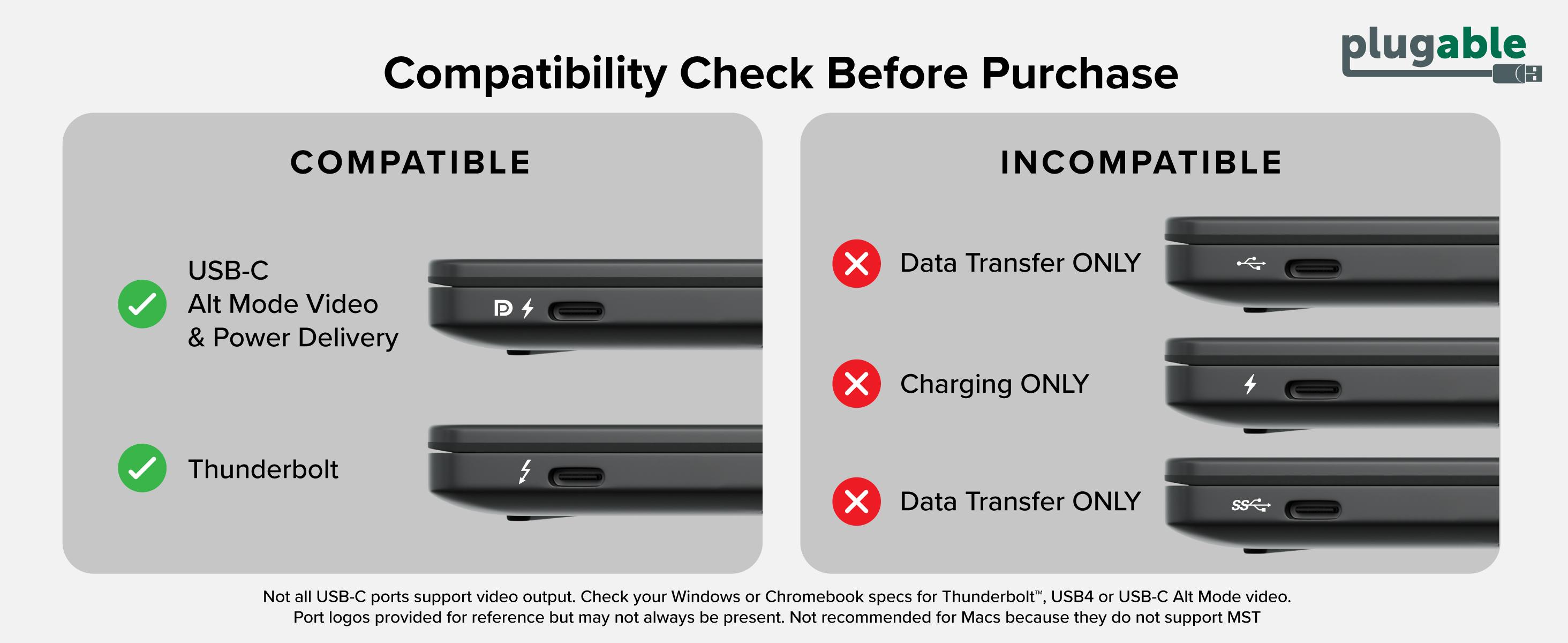
- Incompatible Host Systems: Not all computers with USB Type-C ports can support Alt-Mode video output, some manufacturers use this feature to differentiate between product lines or may even have a mix of compatible and incompatible hosts within the same product line. We recommend confirming the system supports USB Type-C video before purchasing a MST docking station.
The Plugable Advantage: Port Selection and Usability
The Plugable UD-MSTH3 eliminates the need for display port adapters by integrating three HDMI ports to support the most common connector for both 4K and 1080P displays, a dedicated 30W USB-C fast-charging port, an additional USB 2.0 port for peripherals, and Micro/SD card reader.
Thoughtful Monitor Compatibility
The UD-MSTH3 features three native HDMI 2.0 ports. Because HDMI is the most widely adopted input across consumer and business monitors, users can connect up to three standard screens without purchasing extra DisplayPort-to-HDMI adapters. By comparison, the HP G6 dock features two DisplayPort 1.4 outputs and one HDMI 2.1 port, meaning users with HDMI-only monitors must source active conversion cables for triple-display setups.
Smart Power & Charging Infrastructure
Desk productivity often requires charging secondary mobile devices alongside the host laptop, for example charging up your phone or tablet while working:
- Dedicated 30W Charging Port: The UD-MSTH3 features a dedicated 30W USB-C charging port on the front panel. This frees up high-speed USB data ports while supplying dedicated fast charging to phones or tablets.
- HP G6 Data/Power Sharing: The HP G6 provides two 15W USB-C ports, forcing users to choose between data transfer and lower-wattage device charging.
- 100W USB Power Delivery: Both docks negotiate standard USB PD profiles up to 100W, safely powering and charging most modern notebook computers over a single cable.
Peripheral Expansion & Networking
The UD-MSTH3 includes an additional legacy USB 2.0 (480Mbps) Standard-A port, connect mouse, keyboard, printer etc., low-speed devices without sacrificing a SuperSpeed USB port. Furthermore, the UD-MSTH3 includes full-sized SD and MicroSD card slots for fast media transfers, no separate adapter or dongle necessary.
Both docking stations include a 2.5Gbps Ethernet port, offering 2.5 times the speed of traditional Gigabit Ethernet, allowing users to leverage high-speed local network storage (NAS) or multi-gigabit internet connections. These are still backwards-compatible with standard 1Gbps switches and routers if you don’t have multi-gigabit networks, or don’t plan to upgrade any time soon.
Operating System Transparency and macOS Compatibility
Plugable clearly documents hardware and operating system requirements to prevent unexpected display mirroring, whereas HP lists macOS compatibility without disclosing Apple's native MST limitations.
Clear hardware documentation saves time and prevents deployment headaches for IT managers and end-users alike.
Plugable explicitly lists the UD-MSTH3 for Windows 11, Windows 10, and modern ChromeOS systems. By clearly defining supported operating systems, users know exactly what performance to expect regarding triple 1080p/4K extended display output, host charging, and driverless Alt Mode operation.
Conversely, the HP product listing claims compatibility with Windows, macOS, Linux, ThinPro, and ChromeOS. However, the documentation omits a critical caveat: because macOS does not support DisplayPort MST, Mac users connecting to the HP G6 will be unable to extend across three monitors. HP's lack of disclosure regarding macOS display mirroring creates confusion during enterprise purchasing and for end users.
Final Verdict: UD-MSTH3 vs. HP G6 Dock
Superior documentation, broader peripheral connectivity, integrated SD card readers, and a $149.99 price point make the Plugable UD-MSTH3 a more functional and cost-effective choice than the HP G6 dock.
When evaluating both docking stations side-by-side, the Plugable UD-MSTH3 emerges as the clearer choice for Windows and ChromeOS users seeking a transparent, feature-rich multi-monitor solution.
While the HP USB-C 100W G6 offers a sleek recessed cable routing design under its bottom panel and a proprietary power button for select HP laptops, its lack of published video specifications, higher price point, and missing card reader options limit its overall value.
The Plugable UD-MSTH3 provides three universal HDMI video outputs, a dedicated 30W USB-C device charging port, an additional USB 2.0 port for wireless peripherals, built-in SD/MicroSD card readers, and clear display resolution guidelines. At a standard retail price below HP's sale price, the UD-MSTH3 delivers superior versatility for any modern desktop setup.
Frequently Asked Questions (FAQ)
Does the HP USB-C 100W G6 Dock support triple monitors?
Yes, we think, the HP USB-C 100W G6 Dock appears to support up to three external displays when connected to a compatible Windows 11 or ChromeOS host computer with DisplayPort 1.4 MST support. However, HP does not specify the maximum display resolutions supported across triple-monitor configurations in its official user guides, so please take this with a grain of salt.
Can I use MST docking stations like the Plugable UD-MSTH3 with macOS or MacBook?
No, DisplayPort MST docking stations like the Plugable UD-MSTH3 are not recommended for macOS or MacBook devices. Apple operating systems do not support DisplayPort Multi-Stream Transport (MST), meaning connected Macs will only support a single extended display or duplicate (mirror) the same image across all connected monitors.
How does host laptop charging work with 100W USB Power Delivery?
Both the Plugable UD-MSTH3 and HP USB-C 100W G6 Dock utilize standard USB Power Delivery (USB PD 3.0) protocols over the primary USB-C host connection. The dock negotiates with the connected laptop to safely deliver up to 100W of power, adjusting down automatically if the host laptop requires lower wattage (such as 45W or 65W).
View Other Articles in Category
Related Articles
- Which Docking Station for a Laptop With USB-A, or a Basic USB-C Port?
- Best Docking Station for MacBook Air M4 and M5 (2026)
- Master Clamshell Mode: How to Run Dual Monitors with Your MacBook Lid Closed
- The USB-C Port Decoder: How to Tell if Your Laptop Port Supports Video, Charging, or Just Data
- The Dual 4K Display Dock Guide for Your Laptop


Loading Comments