Why I Use a Plugable TBT-UDM Docking Station with my Mac mini M4
Product Owners | May 12, 2026

Article Summary
The Plugable TBT-UDM docking station expands the connectivity of the Apple Mac mini (M4) by adding 13 essential ports, including dual 4K HDMI outputs, a downstream Thunderbolt port for high-speed data transfer, and convenient SD and microSD media card access. Plugable’s Bob Boerner discusses why this desktop solution is ideal for the Mac mini. By centralizing connectivity through a single Thunderbolt 4 connection, the TBT-UDM maximizes productivity and organization for any high-performance Mac mini M4 setup.
My credentials
Hi, I’m Bob. In my 11 years working at Plugable as a Product Owner, I have used a wide variety of computers, peripherals, and Plugable products in order to do my job. In this blog post, I want to share what devices I am using presently and why those devices meet my needs, because I believe my setup might help others looking for a similar solution.
My devices and requirements
At present, I use an Apple Mac mini with an M4 CPU to accomplish my daily tasks. That in itself is not unusual, however what some may consider unusual is that I also use a TBT-UDM docking station connected to my Mac.
Why would some consider that unusual? Because typically when one thinks about a computer docking station they associate using it in conjunction with a laptop computer. However, a docking station can also add a lot of value and functionality to desktop computers.
To expand further, my Apple Mac mini M4 has:
- Three Thunderbolt ports on the back of the computer
- One HDMI port on the back of the computer
- Two USB-C ports on the front of the computer
These ports provide a decent amount of expandability (especially considering the size of the computer, which is only 5 inches square and 2 inches tall), however for my needs it is still somewhat limited. The devices I need to use consistently are:
- Two (and sometimes three) monitors
- Multiple USB-A devices (keyboard, webcam, storage drives, etc.)
- Multiple USB-C devices (storage drives, charging cables)
- Full-size SD and microSD memory cards
While I can connect some of my devices to the Mac’s built-in ports, I can’t connect them all at the same time. And in some cases, I need to connect multiple additional devices (such as a USB hub or a media card reader).
My solution - the TBT-UDM
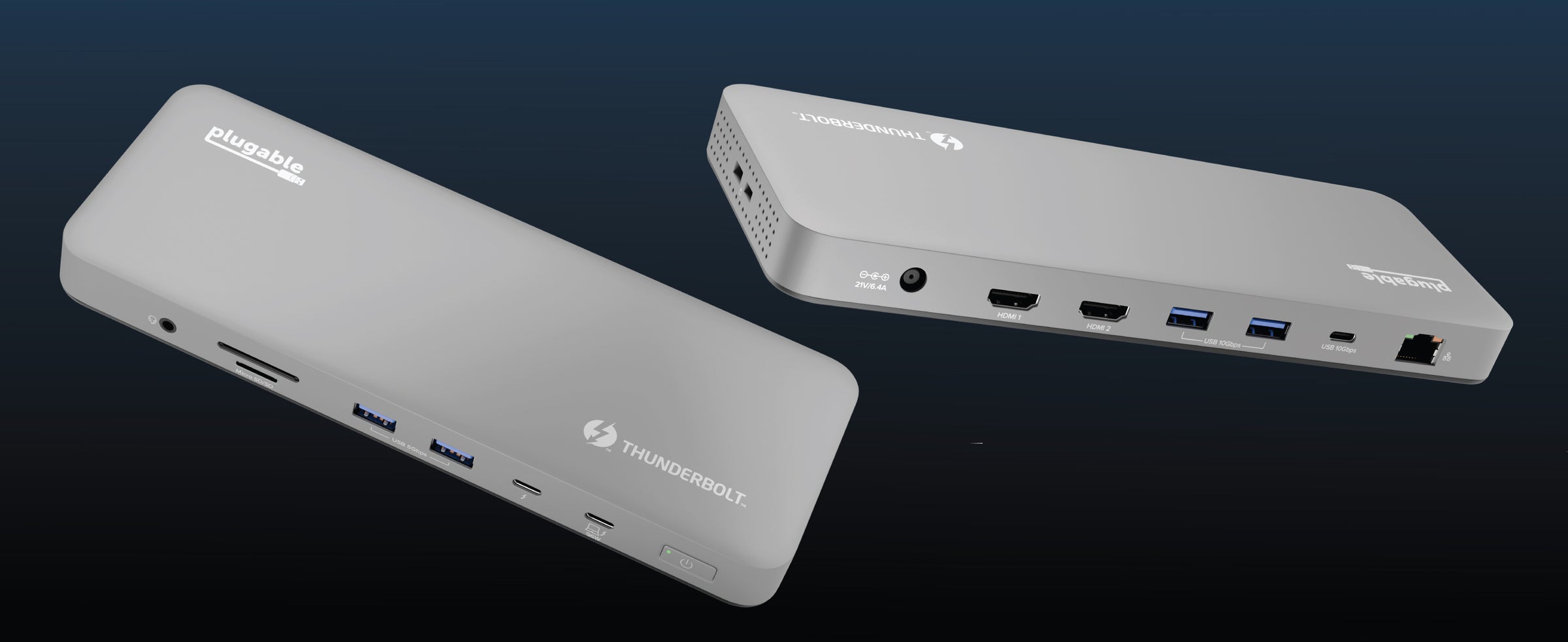
The solution that allows me to use all of my devices at the same time is a Plugable TBT-UDM docking station. For reference, the TBT-UDM is a Thunderbolt 4 docking station that provides the following capabilities:
- Two HDMI outputs, each supporting one display up to 4K 60Hz
- One downstream Thunderbolt 4 port
- One 10Gbps USB-C port
- Two 10Gbps USB-A ports
- Two 5Gbps USB-A ports
- One full-size SD card reader and one microSD card reader
- One wired Gigabit Ethernet network port
- One 3.5mm analog combination audio jack (supports head phones, speakers, and combination headsets)
By connecting my Mac mini to the TBT-UDM, I can now use all of my devices at the same time.
For example, the Mac mini supports a total of three external displays via the Mac mini’s built-in HDMI video output and up to two displays via the Mac mini’s Thunderbolt ports. I have one monitor connected to the HDMI output built into my Mac, and I have a second monitor connected to one of the HDMI outputs on the TBT-UDM. As needed, I can connect a Plugable USBC-PDMON portable monitor to the TBT-UDM’s downstream Thunderbolt port to give me access to a total of three external displays.
To be clear, the TBT-UDM supports a maximum of two external displays via a combination of its built-in HDMI ports and downstream Thunderbolt 4 port. You cannot use three external displays using only the TBT-UDM itself.
As opposed to using a separate USB-A hub, I can now connect my USB-A devices to the TBT-UDM’s four USB-A ports, and instead of a separate USB media card reader, I use the TBT-UDM’s built-in media card readers.
In terms of audio, I can keep my headphones connected to my Mac’s built-in 3.5mm audio jack and keep my external speakers connected to the TBT-UDM’s built-in 3.5mm audio jack. To switch back and forth between the two, I just need to change the default audio output device in macOS.
The combination of the Mac mini M4 and the TBT-UDM not only allows me to use all my devices at the same time, but it also allows me to simplify my setup with a docking station. And for what it’s worth, the dock even matches the color of my Mac.
Summary
Most people typically associate using a docking station with a laptop computer. However, many docking stations can also be used with desktop computers in order to provide expandability and the ability to use many peripherals at the same time.
The Apple Mac mini with a M4 CPU provides a lot of power in a small package, however out of the box it is not as expandable as other computers. The addition of the Plugable TBT-UDM docking station allows me to not only make use of the capabilities built into my Mac, but it also affords much greater expandability. Now I can use all of my devices at the same time while still matching the overall aesthetic.
Frequently Asked Questions (FAQs)
1. Many Thunderbolt docking stations can also provide power to charge a laptop computer. Does the TBT-UDM do that, and if so, is it safe to connect to a desktop computer?
In brief, yes, it is safe to connect the TBT-UDM to my Mac.
To expand further, the TBT-UDM can provide up to 96W of power to charge the host computer via a process known as USB Power Delivery (aka USB PD).
When a host device (in this case, my Mac desktop) is connected to a device that can provide power (in this case, the TBT-UDM), the two devices will communicate in order to determine if power should be provided.
Since the Mac mini is a desktop computer that gets its power from a standard electrical power cable and cannot be charged like a laptop, the TBT-UDM will not attempt to provide power to the computer.
2. Do I need to install any drivers in order to use the TBT-UDM with my Mac mini desktop?
No driver installations are required in order to use the TBT-UDM with a Mac.
3. Does the TBT-UDM have an internal fan? In other words, does it make any noise while in use? This is important because my Mac mini M4 is very quiet.
No, the TBT-UDM does not have an internal fan. The TBT-UDM is silent during normal operation.
View Other Articles in Category
Related Articles
- Move to a New Mac Faster with Plugable Thunderbolt Cables and macOS Migration Assistant
- Head to Head: Plugable UD-MSTH3 vs the Anker 575
- Understanding Thunderbolt 5 Bandwidth and Mac Multi-Monitor Configurations
- Head to Head: Plugable UD-ULTC4K and UD-6950PDZ vs. Kensington K33621NA USB-C Triple 4K Dock
- Head to Head: Plugable TBT-UDH2 vs CalDigit TS5 and TS5 Plus


Loading Comments