


Hassle free, 2-Year Warranty
Fast, Free Shipping on Orders $35+
Lifetime Technical Support
30-Day Money Back Guarantee
Plugable Thunderbolt 5 Cable 80Gbps (3.3ft/1m)
$34.95 USD
SKU: TBT5-240W1MAmazon Rating : (77 Reviews)
Features
- At a Glance— This Thunderbolt 5 Cable from Plugable (TBT5-240W1M) is the complete package with 80Gbps data transfer speeds, 8K video capable, and 240W Power Delivery. And at just over 3 feet (1 meter), it has just the right length to go where you need it
- Data and Video— The TBT5-240W1M can handle up to 80Gbps for ultra-fast data and supports Thunderbolt 5 Bandwidth Boost up to 120Gbps to drive multiple high-resolution displays. In fact it can handle dual displays at up to 8K, and triple displays at 4K 144Hz (which is totally nuts). Pairs well with video editing, gaming, and IT environments
- 240W Charging— This Thunderbolt and USB-IF Certified and 3rd party UL 9990 tested 240W USB-C charge cable supports Power Delivery (PD). This cable is capable of charging the big stuff like high-performance laptops, gaming rigs, and power banks, and the little stuff too, like earbuds, and phones
- Compatibility— If it has Thunderbolt 5, Thunderbolt 4, USB4, or USB-C, this plays nice. Works with Windows, MacBook, iPad Pro, external GPUs, docking stations, 8K displays, SSDs, seriously just about anything
- Lifetime Support— This Thunderbolt cable has been designed with reliability at its core and was built to meet the deployment demands of IT departments and the ease of use necessary for home offices. Includes lifetime support from our North American team of connectivity experts
For volume orders or business inquiries contact sales@plugable.com
Free 3-Day Continental U.S. Shipping on Orders Over $35!


Tech Specs
| Certifications | Thunderbolt and USB-IF Certified, third party tested to UL 9990 standard |
| Length | 1m (3.3ft) |
| Bandwidth | 80Gbps Bi-Directional; Up to 120Gbps with Bandwidth Boost |
| Power Delivery | Up to 240W |
| Display Support | With compatible host - Single 4K 540Hz, Dual 8K 60Hz, or Triple 4K 144Hz |
A: This cable can be used for virtually any use-case involving Thunderbolt or USB-C, including docking stations, storage drives and media, high-resolution monitors/displays, eGPUs, mobile and VR devices, networking adapters, charging, and more.
A: Yes, this cable can be used with any USB-C power adapter, bank, dock, or hub to charge devices with a maximum power delivery of 240W. Lower wattages are also supported.
A: This cable supports 80Gbps bi-directional bandwidth and supports Thunderbolt 5 Bandwidth Boost up to 120Gbps in one direction to drive multiple high-resolution displays.
A: This cable can support a single 4K display at 540Hz, dual 8K displays at 60Hz, and triple 4K displays at 144Hz on hosts with DP 2.1 Alt Mode and Display Stream Compression. This cable also supports HDR.
A: Yes, this cable is backward compatible with Thunderbolt 4, Thunderbolt 3, USB4, and USB-C.
 |
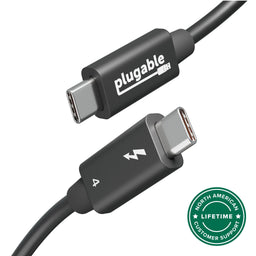 |
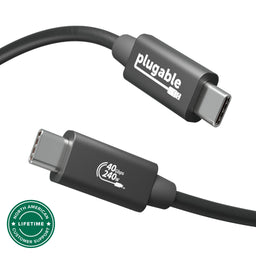 |
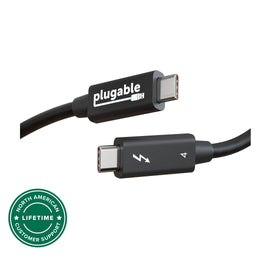 |
|
|---|---|---|---|---|
Certifications |
Thunderbolt and USB-IF Certified |
Thunderbolt and USB-IF Certified |
USB-IF Certified |
Thunderbolt Certified |
Passive/Active |
Passive |
Passive |
Passive |
Active |
Length |
1m (3.3ft) |
1m (3.3ft) |
1m (3.3ft) |
2m (6.6ft) |
Power Delivery |
240W 48V/5A |
240W 48V/5A |
240W 48V/5A |
100W 20V/5A |
Bandwidth |
80Gbps (Up to 120Gbps with Bandwidth Boost) |
40Gbps |
40Gbps |
40Gbps |
Supported Resolutions |
Three 4K displays, or two 8K displays |
Two 4K displays or one 8K display |
Two 4K displays or one 8K display |
Two 4K displays or one 8K display |
Filter Help Articles and Frequent Questions by Category
Choose one or more filters within each category to narrow down the articles. Each selection will result in only displaying articles that include all of your choices.
Articles
Well how about that, it looks like we don't have any articles matching your filters! Try removing one of your choices or clear the filters to show all articles.
You can always contact support if you need help too!
What is Thunderbolt 5 Bandwidth Boost?
One of the major advertised features of Thunderbolt 5 is something Intel calls “Bandwidth Boost”. Thunderbolt 5 is capable of up to 80Gbps bi-directional bandwidth, which already is double that of Thunderbolt 4. Thunderbolt 5 Bandwidth Boost can increase this to up to 120Gbps in one direction for even greater display and data capabilities.
How it works
Thunderbolt 5 utilizes what is known as PAM-3 Technology in order to achieve these 80-120Gbps bandwidths. While the exact details of PAM-3 are not that important for the end user, those curious can find more details on the technology here.
For Bandwidth Boost specifically, the 120Gbps is not generated out of thin air. Instead, the data transfer over Thunderbolt 5 operates in an asymmetric mode, where 120Gbps are allocated in one direction, and 40Gbps are allocated to the other direction, resulting in the same amount of overall bandwidth.
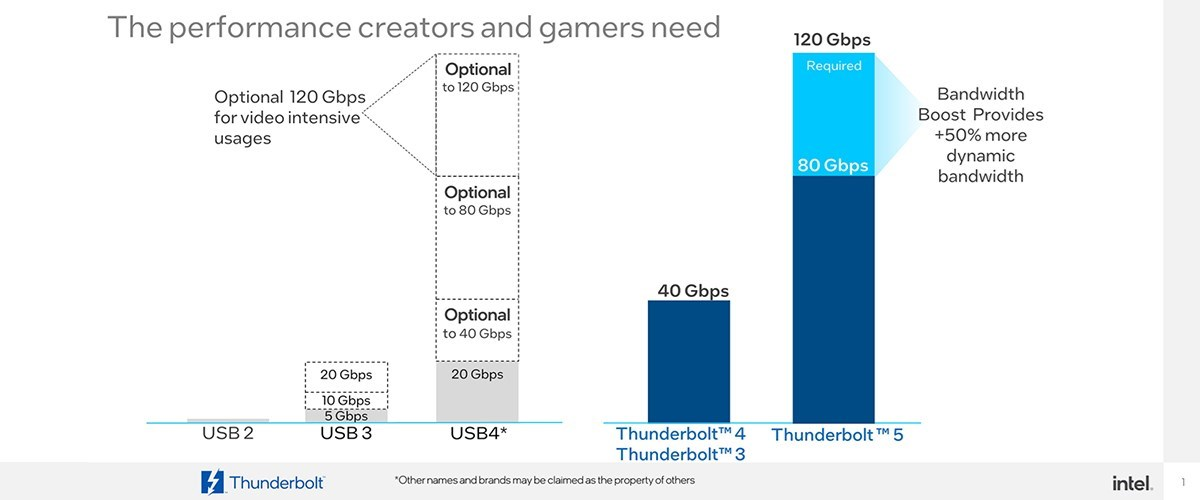
This extra 40Gbps can be dynamically allocated based on the demand. Where this especially comes into play is with displays. Bandwidth Boost over Thunderbolt 5 allows you to connect up to 2x 8K displays at 60Hz or 3x 4K displays at 144Hz. It can even handle up to 540Hz on a single 1080p display. Bandwidth Boost will only activate when needed, such as when you connect 2x 8K displays. That way, you don’t need to worry about losing out on any bandwidth in one direction if you don’t have to.
All this to say that the ability to connect large scale display setups with multiple 4K or 8K displays is now possible with Thunderbolt 5 and Bandwidth Boost!
While Thunderbolt 5 is not common in many hosts at the time of writing this, it is expected to be adopted more widely in the near future. One host that it is available on is the M4 MacBook Pro, which we have done testing with already.
Can I Use a Thunderbolt 5 Cable to Connect to a Thunderbolt or USB-C Device Such as a Phone, iPad, or Docking Stations?
Yes, Thunderbolt 5 cables are compatible with any USB-C port for data transfer, charging, or video (capabilities will depend on peripheral used).
Do Thunderbolt 5 Cables Support USB-C Power Delivery for Host Charging?
Yes, Thunderbolt 5 cables can support up to 240W of power allowing you to keep your devices charged.
Are Thunderbolt 5 Cables Compatible With Thunderbolt 4 and Thunderbolt 3 Computers and Devices?
Yes, Thunderbolt 5 cables are backward compatible with Thunderbolt 4 and Thunderbolt 3 and USB-C devices.
Applicable To:
Thunderbolt 5 Cables
USB-C vs. Thunderbolt: Understanding the Differences
While USB-C and Thunderbolt share the same physical rounded rectangle connector they operate in fundamentally different ways.
The Main Differences Aren't Physical
USB 3 at 5Gbps and 10Gbps with Type-C - often simplified to USB-C - is both the hardware connector standard, and the included data types: USB 5Gbps or 10Gbps data rates, as well as optionally DisplayPort Alternate Mode video and USB Power Delivery for powering and charging both host computers, and downstream devices.
Thunderbolt, specifically Thunderbolt 3 and newer and USB4 use the same physical USB Type-C port, and support a backwards compatibility with USB-C devices, however the signaling and data structure is completely different. Both Thunderbolt and USB4 operate at between four to sixteen times the speed of USB 3. While USB offers optional display and charging, these are mandatory for Thunderbolt hosts. The way display data is transmitted is also different.
DisplayPort Alternate Mode for USB 3 occupies two or four of the physical data lanes in the USB Type-C connector and cable. Tunneled DisplayPort video in Thunderbolt (and USB4) packetizes the DisplayPort video data and transmits it within Thunderbolt/USB4 data packets. Tunneled DisplayPort allows for more native DisplayPort streams enabling multiple external displays at higher resolutions and refresh rates.
Power Delivery is the USB Type-C (as in the port) charging and power standard - this allows a power source and device to negotiate a voltage and maximum amperage both devices can support. For example a phone might negotiate a 9V 3A charge rate which is close to optimal for a phone size battery, while a notebook computer is more likely to negotiate 20V 5A both for improved battery charging and to power the system under moderate to heavy workloads.
Why USB-C and Thunderbolt Capabilities Differ
USB Type-C is a connector standard where features such as video output (DisplayPort Alt Mode) and USB Power Delivery (PD) are optional and depend on the host device manufacturer. In contrast, Thunderbolt sets mandatory performance and hardware requirements across data, video, and power protocols.
- USB 3.0 / 3.1 Gen 1: Up to 5Gbps data transfer speed.
- USB 3.2 Gen 2: Up to 10Gbps data transfer speed.
- USB 3.2 Gen 2x2: Up to 20Gbps data transfer speed. This is very rarely implemented and most computers do not support it.
- Thunderbolt 3: Up to 40Gbps data transfer speed, supports dual DisplayPort 1.2 enabling two 4K or a single 5K displays, USB, DisplayPort, PCIe over a single cable, and up to 100W Power Delivery.
- USB4: Up to 40Gbps data transfer speed, supports DisplayPort 1.4 either one or two external displays, PCIe, and optional Thunderbolt 3 compatibility, USB 3.2 Gen 2 10Gbps, and Power Delivery.
- Thunderbolt 4: Up to 40Gbps data transfer speed, supports dual 4K or single 8K displays, USB4 compatibility, USB 3.2 Gen 2 10Gbps, and Power Delivery.
- Thunderbolt 5: Up to 80Gbps bi-directional bandwidth (DisplayPort up to 120Gbps using Bandwidth Boost), supports dual 6K or single high-refresh-rate 8K displays, PCIe, and backward compatibility with Thunderbolt 4 and USB4, USB 3.2 Gen 2 10Gbps.
Effectively each tier from this list supports all of the features of the tier above as well as some new features. Thunderbolt 4 is Intel's implementation of USB4 with all optional features enabled.
How to Identify Ports and Ensure Compatibility
- Port Identification: Thunderbolt ports are usually marked with a lightning bolt symbol with a downward pointing triangle at the bottom point, this should be next to the port, while USB-C ports may be unmarked or feature symbols indicating power delivery (a simple lightning bolt is common) or DisplayPort capabilities ("DP" logo is often used). Always refer to device technical specifications for confirmation.
- Connecting Thunderbolt Devices to USB-C Ports: Thunderbolt 3, 4, or 5 devices connected to standard USB-C ports typically operate at reduced capabilities, such as lower speeds or fewer display outputs.
- Connecting USB-C Devices to Thunderbolt Ports: USB-C devices connected to Thunderbolt ports function normally, but cannot take advantage of full Thunderbolt features.
Applicable To
- Plugable docking stations, hubs, and video adapters
- USB-C standards (USB 3.0, 3.1 Gen 1, 3.2 Gen 2, 3.2 Gen 2x2, USB4)
- Thunderbolt standards (Thunderbolt 3, Thunderbolt 4, Thunderbolt 5)
If you have any questions please feel free to contact us at support@plugable.com and we'll be happy to help!
What Is the Maximum Length Thunderbolt Cable That Can Be Used to Connect a Plugable Thunderbolt Docking Station to the Host Computer?
All Thunderbolt docking stations include the appropriate Thunderbolt cable in order to connect the docking station to the host computer. As of this writing, all Plugable Thunderbolt host cables that are included with Plugable Thunderbolt docking stations are 1.0 meter (approximately 3.3) feet in overall length.
For reference, the specifications of all Plugable Thunderbolt cables are printed on a small white cable flag attached to the cable itself.
If the original 1.0 meter long Thunderbolt host cable is not sufficient for a specific use case, longer cables of up to 2.0 meters (approximately 6.6 feet) in overall length can be purchased separately from Plugable. An example of such a cable is the Plugable TBT4-40G2M cable
Plugable does NOT support the use of any type of Thunderbolt extension cable or any type of signal repeater in conjunction with our products.
Please note, Plugable can only guarantee the performance and compatibility of Plugable brand cables.
Applicable To:
Plugable Thunderbolt Cables
Plugable Thunderbolt Docks
Can I Use a Thunderbolt 5 Cable as a Replacement Thunderbolt 4 or Thunderbolt 3 Cable?
A Thunderbolt 5 cable is a suitable replacement for Thunderbolt 4 and Thunderbolt 3 docks and peripherals.
Why a Thunderbolt 5 Cable Can Be Used on a Thunderbolt 4 or Thunderbolt 3 Device?
Thunderbolt 5 is designed with backwards compatibility in mind, so the cable itself can support both Thunderbolt 5 and older Thunderbolt 4 or Thunderbolt 3 devices, which allows for future proofing your setup.
Applicable To
Thunderbolt 5 cables


- Choosing a selection results in a full page refresh.
