Hassle free, 2-Year Warranty
Fast, Free Shipping on Orders $35+
Lifetime Technical Support
30-Day Money Back Guarantee
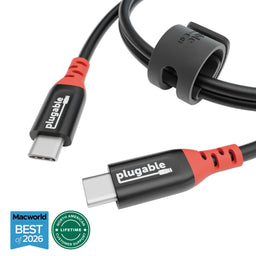
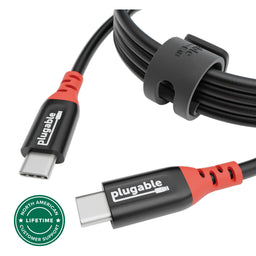
Plugable USB-C Cable, Data Blocker Charge Only, 240W (6.5 ft / 2m)
$15.95 USD
SKU: USBC-CC2MAmazon Rating : (84 Reviews)
Features
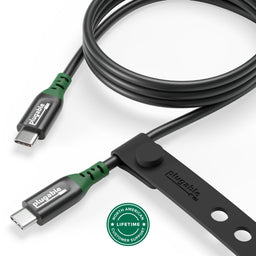
- Get Charged Up— Meet Plugable’s 2m (6.5ft) 240W USB-C to USB-C cable designed exclusively for charging. With no data lines for safer use in public spaces and protection against juice jacking. Delivers clean, reliable power to laptops, tablets, and phones. Includes a cable tag so you always know the specs, plus a strap for easy cable management
- Extended Power Range to 240W— This USB C cable fast charging supports up to 240W power (48V/5A), ideal for gaming laptops, pro workstations, and large tablets. The cable communicates with your device to ensure safe, consistent, and efficient charging
- Safer by Design— Standard USB-C cables carry data. This true USB C charging cable only physically carries power. That means real protection in airports, cafes, schools, and any public charging port. No adapters needed, just direct, secure charging
- Universal USB-C Charging— Works with any device that supports USB Power Delivery up to 240W, including MacBook Pro/Air/Neo, Dell XPS, Lenovo ThinkPad, iPad Pro, and Samsung Galaxy. This USBC to USBC design fits USB-C chargers, hubs, docks, and other PD-compliant gear
- Lifetime Support— This USB C fast charging cable has been designed with reliability at its core and was built to meet the deployment demands of IT departments and the ease of use necessary for home offices. Includes lifetime support from our North American team of connectivity experts
For volume orders or business inquiries contact sales@plugable.com
Free 3-Day Continental U.S. Shipping on Orders Over $35!
All Buying Options
A: No. This is a true charge-only cable. It physically omits all USB data lines, preventing any data transfer for enhanced security against juice jacking and other threats.
A: Supports any USB-C device with PD charging, including laptops like MacBook Pro/Air, Dell XPS, Lenovo ThinkPad, plus tablets, smartphones, gaming devices, and USB-C accessories.
A: Up to 240W (48V/5A) with USB Power Delivery 3.1 Extended Power Range (EPR)
A: The integrated E-marker chip ensures accurate power negotiation between your charger and device, enabling safe and efficient high-wattage charging.
A: Many cables marketed as “charging cables” still have USB 2.0 data lines, which leaves you vulnerable to data theft. This cable physically omits them, making it one of the most secure solutions available.
Tech Specs
| Cable Type | USB-C to USB-C |
| Cable Length | 2m (6.6ft) |
| Power Delivery 3.1 | Extended Power Range up to 240W (48V/5A) PD |
| Charge Only | Charges devices without data transfer for improved security |
In The Box
| Item and Quantity | Item Notes |
|---|---|
| 1x USB-C Data Blocking Charging Cable 2m 240W |
Included Cables
| Port Type (Side 1) | Cable Specification | Port Type (Side 2) | Cable Length | External Power for Cable |
|---|---|---|---|---|
| Male USB-C | N/A | USB-C | 2.0m/6.56ft | No |
Connection To Host
| Port | Placement | Version and Link Rate | Features |
|---|---|---|---|
| 1x USB-C | Cable End | N/A |
Physical Stats
| Item | Size (H x W x D) or Length | Weight | SKU or Part Number |
|---|---|---|---|
| USB-C Data Blocking Charging Cable 2m 240W | 2 meters 6.6 feet |
68 grams 2.4 ounces |
USBC-CC2M |
Compatible Devices
Please note that this charge cable should work with any USB-C device that supports Power Delivery.
- Laptops and Ultrabooks: Compatible with USB-C charging laptops, including MacBook Pro/Air/Neo, Dell XPS, HP Spectre, Lenovo Yoga, and ThinkPad series.
- Tablets: Supports charging for USB-C tablets, including the iPad Pro, iPad Air (4th generation and later), Microsoft Surface Pro 7/8, and Samsung Galaxy Tab S series.
- Smartphones: Ideal for USB-C smartphones, including Apple iPhone 16/Pro, Samsung Galaxy S and Note series, Google Pixel, and other Android devices.
- Gaming Devices: Suitable for charging USB-C gaming devices, such as the Nintendo Switch and Steam Deck.
- Accessories: Works with USB-C (PD) power banks, headphones, gaming controllers (PS5, Switch Pro controller), and other peripherals requiring USB-C charging.
Get Started
- Plug one end into a USB-C power adapter (up to 240 W PD supported).
- Connect the other end to your device’s USB-C charging port.
Key Benefits:
- Safe charging only, no risk of data theft (“juice jacking”). (Charge-only cables do not support data)
- Supports the latest USB PD 3.1 EPR standard, up to 240 W.
- Works with laptops, tablets, phones, and gaming devices.
Questions? We're here to help! Please reach out to us at support@plugable.com
Filter Help Articles and Frequent Questions by Category
Choose one or more filters within each category to narrow down the articles. Each selection will result in only displaying articles that include all of your choices.
Articles
Well how about that, it looks like we don't have any articles matching your filters! Try removing one of your choices or clear the filters to show all articles.
You can always contact support if you need help too!
Will a 240W Cable Work With Lower Wattage Devices?
Yes! Our 240W cables can transfer up to 240 watts of power, which means that it can also transfer lower wattages such as 45W, 60W, 85W, 100W, 140W, and anything in between.
Applicable to:
All 240W supporting USB-C cables
USB-C vs. Thunderbolt: Understanding the Differences
While USB-C and Thunderbolt share the same physical rounded rectangle connector they operate in fundamentally different ways.
The Main Differences Aren't Physical
USB 3 at 5Gbps and 10Gbps with Type-C - often simplified to USB-C - is both the hardware connector standard, and the included data types: USB 5Gbps or 10Gbps data rates, as well as optionally DisplayPort Alternate Mode video and USB Power Delivery for powering and charging both host computers, and downstream devices.
Thunderbolt, specifically Thunderbolt 3 and newer and USB4 use the same physical USB Type-C port, and support a backwards compatibility with USB-C devices, however the signaling and data structure is completely different. Both Thunderbolt and USB4 operate at between four to sixteen times the speed of USB 3. While USB offers optional display and charging, these are mandatory for Thunderbolt hosts. The way display data is transmitted is also different.
DisplayPort Alternate Mode for USB 3 occupies two or four of the physical data lanes in the USB Type-C connector and cable. Tunneled DisplayPort video in Thunderbolt (and USB4) packetizes the DisplayPort video data and transmits it within Thunderbolt/USB4 data packets. Tunneled DisplayPort allows for more native DisplayPort streams enabling multiple external displays at higher resolutions and refresh rates.
Power Delivery is the USB Type-C (as in the port) charging and power standard - this allows a power source and device to negotiate a voltage and maximum amperage both devices can support. For example a phone might negotiate a 9V 3A charge rate which is close to optimal for a phone size battery, while a notebook computer is more likely to negotiate 20V 5A both for improved battery charging and to power the system under moderate to heavy workloads.
Why USB-C and Thunderbolt Capabilities Differ
USB Type-C is a connector standard where features such as video output (DisplayPort Alt Mode) and USB Power Delivery (PD) are optional and depend on the host device manufacturer. In contrast, Thunderbolt sets mandatory performance and hardware requirements across data, video, and power protocols.
- USB 3.0 / 3.1 Gen 1: Up to 5Gbps data transfer speed.
- USB 3.2 Gen 2: Up to 10Gbps data transfer speed.
- USB 3.2 Gen 2x2: Up to 20Gbps data transfer speed. This is very rarely implemented and most computers do not support it.
- Thunderbolt 3: Up to 40Gbps data transfer speed, supports dual DisplayPort 1.2 enabling two 4K or a single 5K displays, USB, DisplayPort, PCIe over a single cable, and up to 100W Power Delivery.
- USB4: Up to 40Gbps data transfer speed, supports DisplayPort 1.4 either one or two external displays, PCIe, and optional Thunderbolt 3 compatibility, USB 3.2 Gen 2 10Gbps, and Power Delivery.
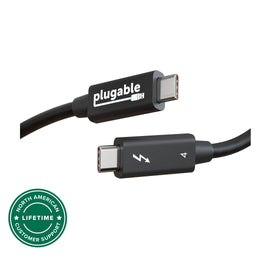
- Thunderbolt 4: Up to 40Gbps data transfer speed, supports dual 4K or single 8K displays, USB4 compatibility, USB 3.2 Gen 2 10Gbps, and Power Delivery.
- Thunderbolt 5: Up to 80Gbps bi-directional bandwidth (DisplayPort up to 120Gbps using Bandwidth Boost), supports dual 6K or single high-refresh-rate 8K displays, PCIe, and backward compatibility with Thunderbolt 4 and USB4, USB 3.2 Gen 2 10Gbps.
Effectively each tier from this list supports all of the features of the tier above as well as some new features. Thunderbolt 4 is Intel's implementation of USB4 with all optional features enabled.
How to Identify Ports and Ensure Compatibility
- Port Identification: Thunderbolt ports are usually marked with a lightning bolt symbol with a downward pointing triangle at the bottom point, this should be next to the port, while USB-C ports may be unmarked or feature symbols indicating power delivery (a simple lightning bolt is common) or DisplayPort capabilities ("DP" logo is often used). Always refer to device technical specifications for confirmation.
- Connecting Thunderbolt Devices to USB-C Ports: Thunderbolt 3, 4, or 5 devices connected to standard USB-C ports typically operate at reduced capabilities, such as lower speeds or fewer display outputs.
- Connecting USB-C Devices to Thunderbolt Ports: USB-C devices connected to Thunderbolt ports function normally, but cannot take advantage of full Thunderbolt features.
Applicable To
- Plugable docking stations, hubs, and video adapters
- USB-C standards (USB 3.0, 3.1 Gen 1, 3.2 Gen 2, 3.2 Gen 2x2, USB4)
- Thunderbolt standards (Thunderbolt 3, Thunderbolt 4, Thunderbolt 5)
If you have any questions please feel free to contact us at support@plugable.com and we'll be happy to help!
Can I connect this product to a computer's Thunderbolt/Thunderbolt 2 port?
Many users assume that USB-C devices can work with older Thunderbolt 2 Macs if they use a Thunderbolt 3 to Thunderbolt 2 adapter, such as the one made by Apple. However, this is not the case. These adapters are specifically designed to support Thunderbolt devices only - not standard USB-C peripherals.
While Thunderbolt 3 and USB-C share the same connector type, they use different underlying data protocols. Non-Thunderbolt USB-C devices, rely on USB standards for data and power. The Thunderbolt 3 to Thunderbolt 2 adapter does not carry USB signals; it only passes Thunderbolt data. Because of this, plugging a USB-C device into a Thunderbolt 2 Mac using this adapter will not work - the computer will not detect or communicate with the device.
If you need to connect peripherals to a Thunderbolt 2 system, we recommend using a USB-A dock or hub (if available on your system). This ensures compatibility without relying on unsupported adapter chains.
In short, even though the connectors may fit, USB-C devices are not compatible with Thunderbolt 2 Macs via Thunderbolt adapters - only Thunderbolt devices will work in that setup.
Will a Charge-Only USB-C Cable Fast Charge My Laptop?
Yes, but only if your laptop, charger, and cable all support the required USB Power Delivery (PD) level. A 240W charge-only cable can also safely charge lower-power devices, but the laptop and charger determine how much power is actually delivered.
How Does Fast Charging Work?
Fast charging depends on three components working together:
- Laptop: Check the maximum USB-C charging wattage your laptop supports.
- Charger: The charger must support the USB Power Delivery voltage and wattage your laptop requires.
- Cable: The USB-C cable must support the required charging wattage. Charging above 100W requires a USB PD 3.1 Extended Power Range (EPR) cable.
| Power Level | What You Need |
|---|---|
| Up to 100W | A USB-C laptop and charger that support the required USB Power Delivery level, along with a compatible USB-C charging cable. |
| Above 100W (140W, 180W, or 240W) |
A laptop and charger that support USB PD 3.1 Extended Power Range (EPR), plus an EPR-rated USB-C cable that supports the required wattage. |
Which Plugable Charge-Only Cables Support USB Power Delivery 3.1 Extended Power Range up to 240W (48V/5A)?
-
USBC-CC1M: 1 meter (3.3 feet)
https://plugable.com/products/usbc-cc1m -
USBC-CC2M: 2 meters (6.6 feet)
https://plugable.com/products/usbc-cc2m -
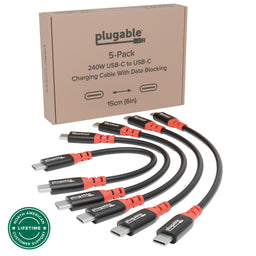
USBC-CCS5X: 6-inch cables, pack of five
https://plugable.com/products/usbc-ccs5x
Using a 240W cable does not mean a laptop receives 240W. USB Power Delivery lets the laptop and charger negotiate the appropriate charging level, so lower-wattage USB-C devices can also charge with these cables.
Applicable To
- USBC-CC1M, USBC-CC2M, USBC-CCS5X
How Secure Are Charge-Only USB-C Cables Against Juice Jacking?
Charge-only USB-C cables provide strong protection against juice-jacking attacks that rely on a USB data connection. By physically omitting the USB data lines, the cable allows charging while preventing normal USB data transfer between your device and the connected USB port.
How Does a Charge-Only USB-C Cable Protect Against Juice Jacking?
Juice jacking refers to attacks in which a malicious or compromised USB charging port attempts to access data or interact with a connected device through the USB data connection.
A charge-only USB-C cable removes that data pathway while still allowing the connected device to receive power.
| Feature | Regular USB-C Cable | Charge-Only USB-C Cable |
|---|---|---|
| Data Transfer | Yes | No |
| Charging Power | Yes | Yes |
| USB Data Connection | Available | Blocked |
Plugable charge-only USB-C cables physically omit the USB data lines, so a connected USB host has no normal USB data path to the phone, tablet, or laptop being charged.
Plugable offers charge-only USB-C cables in multiple lengths:
USBC-CC1M:
https://plugable.com/products/usbc-cc1m
USBC-CC2M:
https://plugable.com/products/usbc-cc2m
USBC-CCS5X(Five pack):
https://plugable.com/products/usbc-ccs5x
What Else Can I Do to Reduce the Risk?
When charging in airports, hotels, conference centers, or other public locations, consider the following best practices:
- Avoid unknown USB charging ports when using a standard data-capable USB cable.
- Use your own AC power adapter when a standard electrical outlet is available.
- Use a trusted battery pack or power bank.
- Use a charge-only USB-C cable when charging from an untrusted USB port and you don't need a data connection.
The FCC provides additional guidance about juice jacking and public USB charging:
https://www.fcc.gov/juice-jacking-tips-to-avoid-it
For more information about juice jacking and Plugable charge-only USB-C cables:
https://plugable.com/blogs/news/juice-jacking-a-growing-threat-and-how-to-safeguard-your-devices
Applicable To
- USBC-CC1M, USBC-CC2M, USBC-CCS5X
Why Choose Charge-Only Cables Instead of Data Blocker Dongles?
Both charge-only USB-C cables and data blocker dongles can prevent USB data transfer while still allowing a connected device to charge. For everyday use, a charge-only cable is often simpler because the data-blocking protection is built into the cable and doesn't require a separate adapter.
How Do Charge-Only Cables and Data Blocker Dongles Compare?
| Feature | Charge-Only Cable | Data Blocker Dongle |
|---|---|---|
| Simplicity | One cable with data blocking built in | Requires a separate dongle and cable |
| Data Blocking | USB data lines are physically omitted | Depends on the design of the data blocker |
| Reliability | Fewer separate connection points | Adds another connection between the cable and device or charger |
| Charging Performance | Plugable charge-only USB-C cables support USB Power Delivery up to 240W | Charging capabilities vary depending on the dongle |
| Best Use Case | Regular charging, travel kits, classrooms, shared spaces, and managed deployments | Adding data blocking to an existing compatible cable when replacing the cable is not practical |
When Should I Use a Charge-Only Cable?
Charge-only cables are a good option for travel kits, classrooms, shared charging areas, and other environments where you don't need USB data transfer. Because the cable blocks data, you don't need an extra dongle to carry, lose, or accidentally leave behind.
Plugable offers three charge-only USB-C cable options:
-
USBC-CC1M: 1 meter (3.3 feet)
https://plugable.com/products/usbc-cc1m -
USBC-CC2M: 2 meters (6.6 feet)
https://plugable.com/products/usbc-cc2m -
USBC-CCS5X: 6-inch charge-only cables, pack of five
https://plugable.com/products/usbc-ccs5x
When Might a Data Blocker Dongle Make Sense?
A data blocker dongle can be useful if you already have data-capable USB cables that you need to continue using. It can provide a convenient way to add data blocking without replacing the existing cable.
For regular use, however, a dedicated charge-only cable reduces the number of separate components and helps ensure the cable cannot provide a normal USB data connection.
Applicable To
- USBC-CC1M, USBC-CC2M, USBC-CCS5X
Can a Charge-Only Cable Be Used for Apple CarPlay or Android Auto?
No. A charge-only USB cable cannot be used for wired Apple CarPlay or Android Auto because these features require a USB data connection between the phone and vehicle.
Why Doesn't a Charge-Only Cable Work?
Charge-only cables provide power but do not support USB data transfer. Without a data connection, the phone and vehicle cannot communicate to set up or operate wired CarPlay or Android Auto.
Other data-dependent features will also not work with a charge-only cable, including:
- File transfers
- USB tethering
- USB-C DisplayPort Alt Mode video output
What Type of Cable Should I Use?
Use a USB cable that supports both charging and data transfer and has the correct connectors for your phone and vehicle.
For Apple's current CarPlay guidance:
https://support.apple.com/en-us/105109
For Google's current Android Auto setup guidance:
https://support.google.com/androidauto/answer/6348029
Applicable To
- USBC-CC1M, USBC-CC2M, Apple CarPlay, Android Auto
Understanding how adaptive/optimized charging methods have an impact on your smartphone's battery life, performance, and longevity.
With most modern smartphones you may have likely noticed a notification message while charging your phone indicating that your phone has entered "Optimized Battery Charging", this is how Apple refers to its smart charging messaging. With Android devices they will also show this notification message while charging although they refer to it "Adaptive Charging". Through these intelligent charging methods your phone will artificially reduce its charging speeds so that in the long run it will lengthen its overall battery life.
When setting up a new smart phone it may take a few weeks of machine learning to recognize your usage behavior and charging habits. Batteries go through wear and tear to which the more charge cycles it goes through the less healthier the overall battery becomes leading to it holding a lesser charge and other issues.
Your phone will alert you with a notification when it enters into a battery preserving charging state. At night you may notice your phone charging significantly slower along with a message saying “Battery full by 7:00 AM”. Even though it has the ability to fully charge in a much shorter time. If you set an alarm for an even earlier time your phone can adjust to finish charging at your alarm time. This is your phone prolonging the time it takes to charge to 100% in order to preserve battery health.
The reason why your phone will artificially slow its charging rate is to spend less time at 100% battery, and the less time your phone spends at 100% the more it helps with your overall battery health.
It is possible to disable Optimized/Adaptive Charging in your device's battery and charging settings although it is ideal for the majority of users to leave this setting enabled.
What Is the Maximum Length Cable That Can Be Used to Connect a Plugable USB-C Docking Station to the Host Computer?
Plugable supports USB-C host connection cables up to 2.0 meters, approximately 6.6 feet, in overall length with Plugable USB-C docking stations. Cables longer than 2.0 meters are not supported.
How Long Can the USB-C Host Cable Be?
All Plugable USB-C docking stations include the appropriate USB-C cable for connecting the docking station to the host computer. The Plugable USB-C host cables included with our docking stations are 1.0 meter (approximately 3.3 feet) long.
For reference, the specifications for Plugable USB-C cables are printed on a small white cable flag attached to the cable.
If the original 1.0 meter USB-C host cable is not sufficient for a specific use case, you can purchase a longer cable (up to 2.0 meters, approximately 6.6 feet) separately from a third party.
We recommend purchasing a cable that matches or exceeds the original Plugable cable's specifications and buying it from a well-known, reliable brand.
Plugable does not support USB-C host connection cables longer than 2.0 meters in overall length with Plugable products.
What Are My Options if I Need a Longer Connection?
Plugable offers a 1.0 meter USB-C extension cable, the USBC-METER3-1MF, that you can use with Plugable USB-C docking stations.
https://plugable.com/products/usbc-meter3-1mf
You can combine the extension cable with the original 1.0-meter Plugable USB-C cable included with the docking station for a total cable length of 2.0 meters.
Plugable does not support the use of third-party USB-C extension cables or signal repeaters with Plugable products.
Applicable To
- USBC-METER3-1MF
- Choosing a selection results in a full page refresh.
Presale Signup
Please note: Not all products are available globally